이 노트에 대하여
org-glossary를 중심으로 용어집과 색인, 관련 패키지를 어떻게 묶어 볼지 정리한 노트다. 조직모드 안에서 전문용어를 더 구조적으로 다루고 싶은 욕구가 강하게 드러난다.
히스토리
- 정리
- 번역
관련메타
관련노트
- @nobiot @NoboraOta #이맥스 #용어집: §ten #패키지 훌륭
- #이맥스: #조직모드: #용어집 #활용법 - 지식관리
- org-index 이거 어떻게 쓰는거야? @데니스덩컨 인덱스 - 색인의 역사
- @이광근 #기계학습 #컴퓨터과학 #SICP #두괄식 #글쓰기 #전문용어
- #용어집: #조직모드 #테이블 #스프레스시트 #변환
@tecosaur Org-Glossary
Note
레퍼런스 노트는 1. 원문 번역, 2. 나의 생각 으로 구성 됩니다. 제 공부를 위해서 간단히 번역 한 것이니 참고 바랍니다.
용어 사전의 중요성
용어를 아십니까
(“Glossary” “Acronyms” “Index” “Text Substitutions”)
- glossaries 용어 사전
- acronyms 줄임말
- indices 색인
나의 생각 : 어떻게 활용 할 수 있을까?!
용어 사전을 직접 만들어 보고 사용해 봐야 한다. 한글과 영어아 혼재하는 경우를 예를 들어서 만들어 보자.
내보내기 보다는 스타일을 맞춰 줬으면 좋겠는데?! 여기서 나온 이야기를 보자면 내 시나리오에 완벽히 커버가 되잖아.
원문 번역 : Org Glossary Manual
tecosaur/org-glossary - github.com
Introduction
Summary 요약
Org Glossary 는 모든 ox-* 백엔드에 대해 정의된 용어의 버퍼 내 강조 표시 및 높은 품질의 내보내기를 지원하여 Org 문서 내에서 glossary-like 구조 (용어집, 두 문자어, 색인 등)로 작업하기 위한 유연한 모델을 정의합니다.
Quickstart
용어집 항목을 정의하려면 Glossary 또는 Acronyms 라는 제목의 문서에 최상위 제목을 배치하고 다음과 같이 Org 정의 목록을 사용하여 용어를 정의합니다.
* Glossary
- Emacs :: A lisp-based generic user-centric text manipulation environment that
  masquerades as a text editor.
- Org mode :: A rich and versatile editing mode for the lovely Org format.
그런 다음 글을 쓸 때 평소 사용하던 대로 용어를 사용하면 됩니다. 내보낼 때 Org Glossary 는 자동으로 다음을 수행합니다.
- Pick up on the uses of defined terms
- Generate a Glossary/Acronym section at the end of the document
- Link uses of terms with their definitions, in a backend-appropriate manner (e.g. hyperlinks in html)
- Give the expanded version of each acronym in parenthesis when they are first used (e.g. “PICNIC (Problem In Chair, Not In Computer)”)
특정 용어에 대한 색인을 생성하려면 거의 동일한 작업을 수행할 수 있습니다. Index 헤딩을 사용하고 그저 일반 목록 (plain list)으로 용어를 나열하면 됩니다.
* Index
- org-mode
이 모든 것이 어떻게 작동하는지 확인하려면 Org Glossary 가 설치된 상태에서 다음 예제를 내보내십시오.
Try using Org Glossary for all your glosses, acronyms, and more within your
favourite ML with a unicorn mascot. It attempts to provide powerful
functionality, in keeping with the simplicity of the Org ML we all know and
love.

* Glossary
- glosses :: Brief notations, giving the meaning of a word or wording in a text.
* Acronyms
- ML :: Markup Language
* Index
- unicorn
Org 모드에 있는 동안 용어 사용에 대한 visual indication 을 보려면 M-x org-glossary-mode 를 호출하십시오.
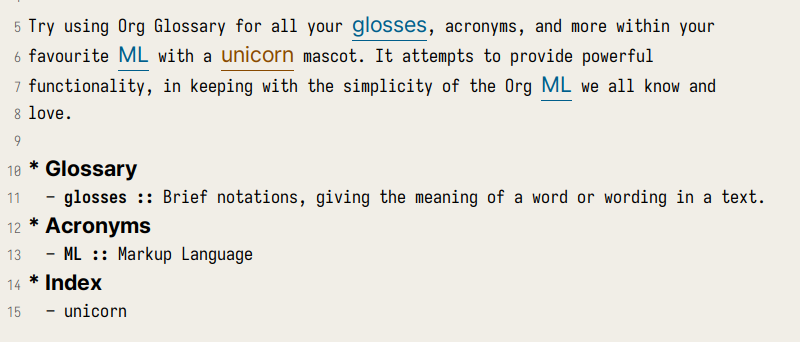 caption=“<span class=“figure-number”>Figure 1: Visual Indication on org-glossary-mode” >
Design
분량이 많거나 기술적인 문서에서는 종종 용어를 명확히 하고 발생 항목을 나열하는 부록이 필요합니다. 이것은 용어집, 색인 또는 다른 형태를 취할 수 있습니다. Org Glossary 는 이러한 모든 용어집과 유사한 형식을 /tracked generated text replacements/로 추상화합니다. 대부분의 구조는 다음과 같습니다.
- Search for definitions of
$term - Replace all uses of
$termwithf($term) - Generate a definition section for all used terms, linking to the uses
Out of the box, four glossary-like structures are configured:
기본적으로 4 개의 용어집과 유사한 구조가 구성됩니다.
Glossary : The term is transformed to the same text, but linking to the definition.
Acronyms : The first use of the term adds the definition in parentheses, and subsequent uses simply link to the definition (behaving the same as glossary terms).
Index : The term is unchanged (the entire purpose of the index is achieved via step 3. alone).
Text Substitutions : The term is replaced with its definition.
인덱스 관련 동작과 (usage detection)과 텍스트 대체하는 동작(fontification)에 관한 약간 특별한 케이스가 있지만, 이는 향후 일반화를 통해 최소한으로 유지되고 이상적으로는 제거가 될 것 입니다.
Usage
Defining terms
Placement of definitions : org-glossary-headings
정의는 기본적으로 org-glossary-headings 에 나열된 특별히 명명된 제목 중 하나 아래에 배치되어야 합니다.
* Glossary
* Acronyms
* Index
* Text Substitutions
org-glossary-toplevel-only 가 t 라면, 위와 같이 헤드라인도 레벨 1의 제목이어야 합니다. nil 이면 문서에서 발생하는 모든 위치에서 인식됩니다. 하위 트리 내보내기 (subtree export) 할 때 org-glossary-toplevel-only 가 non-nil 이라면, 전체 문서에서 헤딩 레벨 1 의 제목만 인식됩니다 (즉, 비-하위 트리 내보내기와 동일하게 작동함).
< sidenote >
서브트리로 관리할 것 인가? 파일을 나누어 관리 할 것 인가 문제이다. 일단 시작은 파일로 나눠서 헤딩 레벨 1 로 제한하는 것이 편할 것이다. 복잡하게 관리하다 보면 결국 감당하기 어렵다.
< /sidenote >
External definition sources
Org Glossary 은 다른 #+include 파일들에 대해서 제목 및 줄 번호의 범위와 같은 조건을 반영하여 용어 정의와 검색을 지원합니다. org-glossary-global-terms 를 통해 전역으로 사용할 수 있는 정의를 제공하는 경로를 지정할 수도 있습니다.
사용하려는 일반적인 용어 소스 집합을 유지 관리하는 경우 #+include 를 사용하는 대신 키워드 #+glossary_sources 를 사용할 수 있습니다.
#+glossary_sources 의 값은 공백으로 구분하여 위치 목록을 형성합니다. 각 위치는 org-glossary-collection-root 를 기준으로 경로가 설정 됩니다.
예를 들어, org-glossary-collection-root 가 여러 개의 파일로 나뉘어 관리되는 경우라면 다음과 같이 설정할 수 있습니다.
#+glossary_sources: abbrevs physics.org::*Quantum foo bar.org이는 다음과 동일합니다.
#+include: COLLECTION-ROOT/abbrevs.org
#+include: COLLECTION-ROOT/physics.org::*Quantum :only-contents t
#+include: COLLECTION-ROOT/foo.org
#+include: COLLECTION-ROOT/bar.org
제목/사용자 정의 ID 검색이 있는 소스는 자동으로 :only-contents t 가 추가됩니다(예제에서 볼 수 있음). 이렇게 하면 org-glossary-toplevel-only 가 설정되어 있을 때에도 서브헤딩을 명시적으로 사용할 수 있습니다.
Basic definitions
Org 모드에는 이미 용어 정의 연결(term-definition associations), 설명 목록(description lists) 에 대한 매우 자연스러운 구조가 있습니다. 용어 정의는 모든 중첩되지 않은 설명 목록에서 추출되며 다른 요소는 무시됩니다.
예를 들어 “late pleistocene wolf” 를 정의하려면 다음과 같이 설명 목록 항목을 사용할 수 있습니다.
- late pleistocene wolf :: an extinct lineage of the grey wolf, thought to be
  the ancestor of the dog
이는 다음과 같은 기본 구조의 해당 합니다.
- TERM :: DEFINITIONAdvanced definitions
automaton :: A thing or being have to have power to have the power or action 과 같이 간단한 정의를 내릴 때 Org Glossary 는 실제로 몇 가지 가정 합니다.
- automaton 은 정의 된 대로 automaton 을 연결 한다.
- 복수형은
org-glossary-plural-function호출하여 복수형인automata를 연결 한다.
이는 다음 “전체 형식”으로 나타낼 수 있습니다.
- automaton,automata = automaton,automata :: A thing or being regarded as having
  the power of spontaneous motion or action
이는 다음과 같은 구조입니다.
- SINGULAR KEY, PLURAL KEY = SINGULAR FORM, PLURAL FORM :: DEFINITION이것은 지나치게 복잡해 보일 수 있지만, 불행히도 불규칙 복수형 과 동형이의어 가 존재합니다. 다음은 이 기능이 작동하는 몇 가지 예입니다.
- eveningtime=evening :: The latter part of the day, and early night.
- eveninglevel=evening :: To make more even, to become balanced or level.
여기서 우리는 “evening”이라는 동일한 용어의 다른 용도를 명확히 하고, 각 용도에 대해 고유한 키를 정의하고자 합니다. 글을 쓸 때 다음과 같이 키를 사용합니다.
In the eveningtime I take to eveninglevel out the sand pit.이제 불규칙 복수형(irregular plurals) 과 결함 명사(defective nouns) 를 모두 살펴보겠습니다.
- ox, oxen :: A male bovine animal.
- sheep, :: A domesticated ruminant mammal with a thick wooly coat.
- glasses, :: An optical instrument worn to correct vision.
“ox, oxen”의 경우 명시적으로 불규칙 복수형을 부여합니다. “Sheep”도 불규칙 복수형이며 쉼표만 넣고 복수형을 생략하면 복수형이 생성되지 않습니다(singularia tantum/으로 처리됨). “안경”에서도 동일한 동작이 발생하며 내부적으로는 /복수형 tantum/이지만 /singularia tantum 으로 표시되지만 동작은 동일하므로 괜찮습니다.
Alias terms : 별칭 용어
때로는 한 용어가 여러 이름으로 사용 될 수 있습니다. 이는 “alias terms” 으로 처리 됩니다.
이것은 분자 생물학 분야를 방문할 예를 통해 가장 잘 설명됩니다.
- beta sheet :: Common structural motif in proteins in which different sections
  of the polypeptide chain run alongside each other, joined together by hydrogen
  bonding between atoms of the polypeptide backbone.
베타 시트는 “beta” 대신 그리스 문자 β 를 사용하거나 “beta pleated sheet” 라고도 합니다. 다음과 같이 이러한 변형을 지원할 수 있습니다.
- \beta sheet :: beta sheet
- beta pleated sheed :: beta sheet
- \beta-pleated sheet :: beta sheet
이러한 각 용어의 정의는 “beta sheet”와 정확히 일치하므로 해당 용어의 별칭으로 인식됩니다.
Categorisation : 카테고리화
많은 용어들의 모음을 보다 쉽게 사용하려면 부제목(sub-headings)을 사용할 수 있습니다.
* Glossary
** Animals

- late pleistocene wolf :: an extinct lineage of the grey wolf, thought to be
  the ancestor of the dog

- ox, oxen :: A male bovine animal.
- sheep, :: A domesticated ruminant mammal with a thick wooly coat.

** Technology

- Emacs :: A lisp-based generic user-centric text manipulation environment that
  masquerades as a text editor.

- glasses, :: An optical instrument worn to correct vision.
이 구조는 내보내기에서 무시되므로 내보내기에 어떤 영향을 미칠지 걱정하지 않고 자유롭게 구성할 수 있습니다. 내보낸 항목을 범주로 분할하려면 :category: 태그가 있는 부제목을 사용하면 됩니다. 범주 태그가 지정된 부제목을 서로 중첩할 수 있지만 가장 안쪽 (innermost) 범주만 적용됩니다.
* Glossary
** Animals :category:
** Technology :category:
*** Text Editors :category:
*** Mechanical :category:
Using terms
Org Glossary 는 모든 정의된 용어를 작성한 글과 연결하려고 한다고 가정합니다. 따라서 내보낼 때 문서에서 정의된 용어의 모든 인스턴스를 스캔하고 이를 네 가지 용어집 링크 유형 중 하나로 변환합니다.
gls, singular lowercaseglspl, plural lowercaseGls, singular sentence caseGlspl, plural sentence case
To switch from implicit associations to explicit, set org-glossary-automatic to nil and then only gls/glspl/Gls/Glspl links will be picked up. To convert implicit associations to explicit links, you can run M-x org-glossary-apply-terms (if nothing happens, try running M-x org-glossary-update-terms first).
암시적 연결에서 명시적 연결로 전환하려면 org-glossary-automatic 을 nil 로 설정하면 gls / glspl / Gls / Glspl 링크만 선택됩니다. 암시적 연결을 명시적 링크로 변환하려면 M-x org-glossary-apply-terms 를 실행할 수 있습니다(아무 일도 일어나지 않으면 M-x org-glossary-update-terms 를 먼저 실행해 보십시오).
Org Glossary 은 링크에 의존하므로 링크로써 적절한 위치에서만 처리 됩니다. (예: 소스 블록, 약어 텍스트 또는 다른 링크 등 내부가 아님). 또한 제목의 용어는 일반적으로 적절한 것으로 간주되므로 무시됩니다.
In addition to all this, there’s a bit of special behaviour for indexing. As you can discuss a topic without explicitly stating it, we support ox-texinfo-style #+[cfkptv]?index keywords. For example:
그 밖에도 인덱싱을 위한 약간의 특별한 동작이 있습니다. 명시적으로는 언급하지 않고 주제에 대해서 토론할 수도 있기 때문에 ox-texinfo 스타일의 #+[cfkptv]?index 키워드를 지원합니다. 예를 들어:
#+index: penguin
The Linux operating system has a flightless, fat waterfowl
(affectionately named Tux) as its mascot.

* Index
- penguin
Printing definition sections
문서를 내보낼 때 식별된 모든 용어집 머리글은 무조건 문서에서 제거됩니다. 다른 조치가 없다면, 용어 사용 정의 섹션을 기반으로 문서에 추가됩니다.
기본 “generate and append to document” 동작을 비활성화하는 #+print_glossary: 키워드를 통해 정의 섹션 생성에 대한 세밀한 제어가 가능합니다.
#+print_glossary: 키워드를 삽입하기만 하면 #+print_glossary: 키워드 위치에 기본적으로 생성된 정의 섹션이 삽입됩니다. 그러나 다음과 같이 여러 babel 스타일 :key value 옵션을 통해 동작을 사용자 정의할 수 있습니다.
:type(glossary acronym indexby default), the specific glossary-like structures that definition sections should be generated for:level(0by default), both:- The scope in which term uses should be searched for, with 0 representing the whole document, 1 within the parent level-1 heading, 2 the parent level-2 heading, etc.
- One less than the minimum inserted heading level.
:consume(nilby default), iftoryesthen marks terms defined here as having been defined, preventing them from being listed in any other#+print_glossary:unless:allis set totoryes.:all(nilby default), behaves as just described in:consumed.:only-contents(nilby default), iftoryesthen the:heading(from the export template) is excluded from the generated content.
이 모든 것을 종합하면 기본 #+print_glossary: 명령은 다음과 같습니다.
#+print_glossary: :type glossary acronym index :level 0 :consume no :all no :only-contents noThe minor mode
정의된 용어 인스턴스의 시각적인 표시는 마이너 모드 org-glossary-mode 에서 제공됩니다. 이는 기본적으로 두 가지 작업을 수행합니다.
- Run
org-glossary-update-termsto update an buffer-local list of defined terms - Add some
fontificationrules to make term uses stand out.
정의된 용어 및 글꼴의 로컬 목록은 다음과 같은 몇 가지 세부 사항을 허용합니다.
- Showing the term definition in the minibuffer when hovering over a fontified use
- Calling
M-x org-glossary-goto-term-definitionor clicking on a fontified use to go to the definition M-x org-glossary-insert-term-referenceto view the list of currently defined terms, and perhaps insert a use.- In the case of Text Substitutions, displaying the replacement text on top of the use, when
org-glossary-display-substitute-valueis non-nil.
Export configuration
Setting export parameters
내보내기를 위해 생성된 콘텐츠는 org-glossary-export-specs 에 정의된 템플릿에 의해 관리됩니다. 곧 이에 대해 자세히 논의하겠지만 지금은 상황에 따라 다르게 생성된 콘텐츠를 원할 것이라고 생각합니다. 이것이 적용되는 두 가지 수준이 있습니다.
- By export backend
- By the type of glossary-like structure (Glossary, Acronyms, Index, etc.)
이는 alist of alists of templates 를 생성하여 설명합니다.
First, we create associations between export backends and specs, with the special “backend” t as the default value, i.e.
먼저 특수 “backend” t 를 기본 값으로 사용하여 내보내는 백엔드와 스펙 간의 연결을 만듭니다.
((t . DEFAULT-TEMPLATE-SET)
 (html . HTML-TEMPLATE-SET)
 (latex . LATEX-TEMPLATE-SET)
 ...)
적절한 템플릿 세트를 선택할 때 실제로 org-export-derived-backend-p (순서대로)를 사용하여 현재 내보내기 백엔드에 대해 각 항목을 확인합니다. 여기에는 두 가지 의미가 있습니다.
- You can export to derived backends (e.g. beamer) and things should just work
- If specifying a template set for a derived backend (e.g.
beamer) be sure to put it before any parent backends (i.e.latex, inbeamer’s case) inorg-glossary-export-specsto ensure it is actually used.
백엔드에 적합한 템플릿 세트는 그 자체로 다음과 같은 템플릿 목록입니다.
((t . TEMPLATE)
 (glossary . TEMPLATE)
 (acronym . TEMPLATE)
 (index . TEMPLATE))
다시 한 번 t 는 기본값을 의미합니다. org-glossary-headings 에 나열된 각 유형에 대해 백엔드별 기본 템플릿에서 먼저 가져온 다음 전역 기본값에서 템플릿을 채웁니다. 이것은 현재 백엔드에 대한 용어집과 같은 구조의 각 유형에 대한 내보내기 동작을 제어하는 완전한 템플릿 세트를 제공합니다.
Structure of an export template set
용어 사용 및 정의 내보내기는 템플릿 세트 에 의해 관리됩니다. 기본 템플릿 세트는 (alist-get t (alist-get t ~org-glossary-export-specs)) 에 의해 제공되며, 기본값은 다음 속성 목록에 의해 제공됩니다.
(:use "%t"
 :first-use "%u"
 :definition "%t"
 :backref "%r"
 :heading ""
 :category-heading "* %c\n"
 :letter-heading "*%L*\n"
 :definition-structure-preamble ""
 :definition-structure "*%d*\\emsp{}%v\\ensp{}%b\n")
각 속성은 특정 상황을 나타내며 값은 다음 중 하나입니다.
- A format string that represents the content that should be used
- A function with the same signature as
org-glossary--export-template, that generated the replacement content string.
:use, :first-use, :definition 및 :backref 속성은 백엔드별 콘텐츠 트랜스코딩(즉, 백엔드 출력 구문 사용) 중에 적용되는 반면 :definition-structure , :category-heading 및 :letter-seperator 는 백엔드별 내보내기 프로세스 직전에 Org 문서의 사본에 적용됩니다(그래서 Org 구문을 사용하여 작성해야 함).
형식 문자열은 다음 토큰을 사용할 수 있습니다.
%t, the term being defined/used. This is pluralised and capitalised automatically based on the link type (gls/glspl/Gls/Glspl).%v, the term definition value.%k, the term key.%K, the term key buffer-local nonce (number used only once). This will only be consistent within a particular Emacs session.%l, the first letter of the term, in lower case.%L, the first letter of the term, in upper case.%r, the term reference index (only applicable to:useand:first-use).%n, the number of times the term is used/referenced.%c, the term category.%u, the result of:use(primarily intended for convenience with:first-use)%d, the result of:definition(only applicable to:definition-structure)%b, all the:backrefresults joined with", "(only applicable to:definition-structure).
:definition-structure-preamble 및 :heading 매개변수는 백엔드별 내보내기 단계 직전에 Org 문서 사본에 삽입되는 리터럴 문자열이기도 합니다.
이러한 속성이 어떻게 작동하는지 설명하기 위해 다음 예제에서는 생성된 콘텐츠 대신 속성 이름을 사용합니다.
Here's some text and now the term :first-use, if I use the term again
it is now :use. Once more, :use.

Now we have the appendix with glossary-like definitions.

:heading

:category-heading
:letter-heading
:definition-structure-preamble
:definition-structure(:definition def-value :backref)
불필요한 문자 제목(즉, 도움이 되지 않음)을 피하기 위해 org-glossary-print-letter-minimums 가 있습니다. 이 변수는 :letter-heading 템플릿을 삽입하기 전에 동일한 문자를 가진 고유한 초기 용어 문자 및 용어의 최소 임계값 수를 지정합니다.
:heading, :category-heading 또는 :letter-heading 이 "* " 로 시작하면 제목을 적절한 수준으로 설정하기 위해 별표가 자동으로 접두사로 추가됩니다.
Creating a new glossary type
몇 가지 예를 살펴보겠습니다. 우선 Index 대신 Indices 제목 아래에 색인화된 용어를 정의할 수 있기를 원한다고 가정해 보겠습니다. 이렇게 하려면 org-glossary-headings 에 항목을 추가하기만 하면 됩니다. 이 작업은 사용자 지정 인터페이스를 통해 또는 다음 스니펫을 사용하여 수행할 수 있습니다.
(customize-set-value
 'org-glossary-headings
 (cl-remove-duplicates (append org-glossary-headings
                               '(("Indices" . index)))))
이것이 실제로 내보내기에 반영되도록 하려면 다음 중 하나를 수행할 수 있습니다.
- Rename the
indexheading to* Indices, or - Create a near-copy of
index, just changing the heading
첫 번째 경우에는 다음 스니펫을 실행하기만 하면 됩니다.
(org-glossary-set-export-spec t 'index :heading "* Indices)Indices 를 사전 정의된 색인 용어와 연결하는 대신 내보내기에 실제로 반영하려면 먼저 ("Indices" . indicies) 쌍을 org-glossary-headings 에 추가합니다( 이전과). 그런 다음 현재 org-glossary-export-specs 에 있는 각 index 템플릿을 복사하고 방금 index 에 대해 수행한 것처럼 기본 :heading 을 업데이트할 수 있습니다.
(dolist (template-set org-glossary-export-specs)
  (when-let ((index-template (alist-get 'index (cdr template-set))))
    (push (cons 'indices index-template) (cdr template-set))))

(org-glossary-set-export-spec t 'indices :heading "* Indices)
마지막 예에서는 Abbreviations 에 대한 지원을 추가하고 싶다고 가정해 보겠습니다. 이것은 두문자어와 거의 같은 방식으로 작동하지만 첫 글자로 구성되지 않은 단어나 구의 축약형을 사용합니다. 이전과 동일한 방식으로 ("Abbreviations" . abbreviation) 쌍을 org-glossary-headings 에 추가한 후 다음과 같이 간단합니다.
(push '(abbreviation :heading "* Abbreviations"
                     :first-use "%v (%u)")
      (plist-get t org-glossary-export-specs))
Tweaking specific exports
org-glossary-export-specs 를 덮어쓰는 대신 다음과 같이 setcdr 또는 plist-put 을 대신 사용하는 것이 좋습니다.
(org-glossary-set-export-spec 'latex t
  :backref "gls-%k-use-%r"
  :backref-seperator ","
  :definition-structure "*%d*\\emsp{}%v\\ensp{}@@latex:\\ifnum%n>0 \\labelcpageref{@@%b@@latex:}\\fi@@\n")
이 예에서는 :definition-structure 를 함수로 설정하여 \ifnum%n>0 LaTeX 스위치를 피할 수 있습니다.
(org-glossary-set-export-spec
 'latex t :definition-structure
 (lambda (backend info term-entry form &optional ref-index plural-p capitalized-p extra-parameters)
   (org-glossary--export-template
    (if (plist-get term-entry :uses)
        "*%d*\\emsp{}%v\\ensp{}@@latex:\\labelcpageref{@@%b@@latex:}@@\n"
      "*%d*\\emsp{}%v\n")
    backend info term-entry ref-index
    plural-p capitalized-p extra-parameters)))
이를 통해 다른 백엔드의 모든 변경 사항이나 특별히 연결되지 않은 기본값을 자유롭게 업데이트할 수 있습니다.
Comments