이 노트에 대하여
consult-omni 기반으로 웹과 로컬, 영상 검색을 하나의 인터페이스에 모으는 흐름을 정리한다. 덩어리가 크고 미완이지만 이맥스 통합 검색 환경의 방향성이 분명하게 드러난다.
히스토리
- 이거 다 정리하려면 시간이 필요합니다. 너무 덩어리가 커서 조금씩 단게별로 접근해야 합니다.
14:24 my/consult-omni web video local 함수
my/consult web, video, local … 나눠서 통합 검색 결과를 하나로 보여주는 워크플로우 설정 몇개 미스된 것 확인.
20250501T142821-consult-omni-search-web
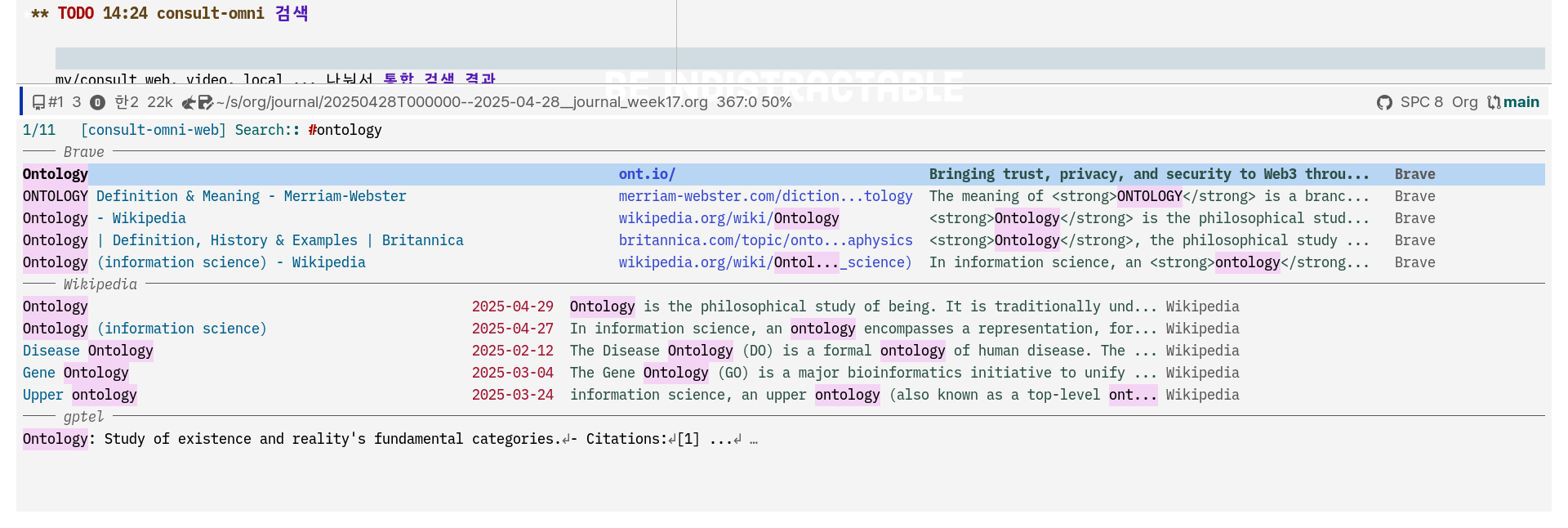
consult-omni 설정
Sacha Chua 2024 “Yay Emacs 6: Inserting links with consult-omni Sacha Chua”
(“프로그래밍 검색 - 모든 검색엔진 - 구글 커스텀 검색 엔진” n.d.) 사용
want to quickly look up and add links. consult-omni lets me search within Emacs instead of switching to a web interface. After I set up consult-omni-google with a Google custom search engine and a JSON API key, I can call it with my shortcut: M-g w. Using M-n for future history pulls in the word at point. Then I can select a site and use Embark to insert with C-. i or copy with C-. w.
웹 인터페이스로 전환하는 대신 상담-옴니를 사용하면 Emacs 내에서 검색할 수 있습니다. Google 사용자 지정 검색 엔진과 JSON API 키로 consult-omni-google을 설정한 후 바로 가기로 호출할 수 있습니다: M-g w. 향후 기록에 M-n을 사용하면 현재 시점에서 단어를 가져옵니다. 그런 다음 사이트를 선택하고 Embark를 사용하여 C-. i로 삽입하거나 C-. w로 복사할 수 있습니다.
consult-omni
가져옴
For some reason, installing consult-omni using the :vc keyword was giving me problems, so I checked it out from Github instead.
I also needed to create a Google custom search JSON API key at https://developers.google.com/custom-search/v1/introduction .
(defun my-insert-or-replace-link (url &optional title)
	"Insert a link, wrap the current region in a link, or replace the current link."
	(interactive (list (read-string "URL: ")))
	(cond
	 ((derived-mode-p 'org-mode)
		(cond
		 ((org-in-regexp org-link-bracket-re 1)
			(when (match-end 2) (setq title (match-string-no-properties 2)))
			(delete-region (match-beginning 0) (match-end 0)))
		 ((org-in-regexp org-link-any-re 1)
			(delete-region (match-beginning 0) (match-end 0)))
		 ((region-active-p)
			(setq title (buffer-substring-no-properties (region-beginning) (region-end)))
			(delete-region (region-beginning) (region-end))))
		;; update link
		(insert (org-link-make-string url title)))
	 ((derived-mode-p 'org-mode)		 ; not in a link
		(insert (org-link-make-string url title)))
	 ((and (region-active-p) (derived-mode-p 'markdown-mode))
		(setq title (buffer-substring-no-properties (region-beginning) (region-end)))
		(delete-region (region-beginning) (region-end))
		(insert (format "[%s](%s)" title url)))
	 ((derived-mode-p 'markdown-mode)
		(insert (format "[%s](%s)" title url)))
	 ((and (region-active-p) (string-match (regexp-quote "*new toot*") (buffer-name)))
		(setq title (buffer-substring-no-properties (region-beginning) (region-end)))
		(delete-region (region-beginning) (region-end))
		(insert (format "[%s](%s)" title url)))
	 ((string-match (regexp-quote "*new toot*") (buffer-name))
		(insert (format "[%s](%s)" (read-string "Title: " (my-page-title url))
										url)))
	 (t
		(insert (format "%s (%s)" title url)))))

;; override the embark actions
(defun my-consult-omni-embark-copy-url-as-kill (cand)
	"Don't add spaces."
	(when-let ((s (and (stringp cand) (get-text-property 0 :url cand))))
		(kill-new (string-trim s))))

(defun my-consult-omni-embark-insert-url (cand)
	"Don't add spaces."
	(when-let ((s (and (stringp cand) (get-text-property 0 :url cand))))
		(insert (string-trim s))))

(defun my-consult-omni-embark-copy-title-as-kill (cand)
	"Don't add spaces."
	(when-let ((s (and (stringp cand) (get-text-property 0 :title cand))))
		(kill-new (string-trim s))))

(defun my-consult-omni-embark-insert-title (cand)
	"Don't add spaces."
	(when-let ((s (and (stringp cand) (get-text-property 0 :title cand))))
		(insert (string-trim s))))

(defun my-consult-omni-embark-insert-link (cand)
	"Don't add spaces."
	(let ((url (and (stringp cand) (get-text-property 0 :url cand)))
				(title (and (stringp cand) (get-text-property 0 :title cand))))
		(my-insert-or-replace-link url title)))

(use-package consult-omni
	:load-path "~/vendor/consult-omni"
  :after (consult embark)
  :custom
  (consult-omni-show-preview t) ;;; show previews
  (consult-omni-preview-key "C-o") ;;; set the preview key to C-o
  :config
	(add-to-list 'load-path "~/vendor/consult-omni/sources")
  (require 'consult-omni-sources)
  (require 'consult-omni-embark)
  (setq consult-omni-sources-modules-to-load (list 'consult-omni-wikipedia 'consult-omni-google))
  (consult-omni-sources-load-modules)
  (setq consult-omni-default-interactive-command #'consult-omni-multi)
	:bind
	(("M-g w" . consult-omni)
	 :map consult-omni-embark-general-actions-map
	 ("i l" .  #'my-consult-omni-embark-insert-link)
	 ("i u" .  #'my-consult-omni-embark-insert-url)
	 ("i t" .  #'my-consult-omni-embark-insert-title)
	 ("w u" . #'my-consult-omni-embark-copy-url-as-kill)
	 ("w t" . #'my-consult-omni-embark-copy-title-as-kill)))
Let’s add [BROKEN LINK: dotemacs:org-bookmarks] as a source.
(defun my-consult-omni-bookmarks (&optional input)
	(let ((quoted (when input (regexp-quote input))))
		(mapcar
		 (lambda (o)
			 (propertize
				(concat (plist-get o :title) "\s"
								(plist-get o :url))
				:title (plist-get o :title)
				:url (plist-get o :url)))
		 (seq-filter
			(lambda (o)
				;; TODO: Someday use regular completion matching, so I can use orderless
				(if quoted
						(string-match quoted (concat (plist-get o :title) " - " (plist-get o :title)))
					t))
			(my-org-bookmarks)))))

(defun my-consult-omni-org-bookmark-transform (candidates &optional query)
	(mapcar
	 (lambda (cand)
		 (propertize
			cand
			:url (and (get-text-property 0 :title cand) (get-text-property 0 :url (get-text-property 0 :title cand)))
			:title (and (get-text-property 0 :title cand) (get-text-property 0 :title (get-text-property 0 :title cand)))))
	 candidates))

(defvar my-consult--org-bookmark-history nil)
(defvar my-consult--source-org-bookmark
	`(:name "My Org bookmarks"
					:narrow ?B
					:category consult-omni
					:face consult-bookmark
					:items ,#'my-org-bookmarks-for-completion))

;; (consult--multi (list my-consult--source-org-bookmark))
(with-eval-after-load 'consult-omni
  (consult-omni--make-source-from-consult-source
   'my-consult--source-org-bookmark
   :narrow-char ?b
   :type 'sync
	 :search-hist 'my-consult--org-bookmark-history
	 :transform (quote 'my-consult-omni-org-bookmark-transform)
   :min-input 1
   :require-match t)

	(setq consult-omni-multi-sources '(consult-omni--source-google consult-omni--source-my-org-bookmarks))

	;;(consult-omni--multi-dynamic (list consult-omni--source-my-org-bookmarks))
  )
Emacs consult-omni package: a powerful omni-search and launcher in emacs
(Emacs Consult-Omni Package: A Powerful Omni-Search and Launcher in Emacs 2024)
-
In this video I show an in-depth review of using consult-omni package for doing omnisearch including searching web search engines, AI assistants, local files…
-
Emacs consult-omni package
Improve your mu4e workflow with consult-mu
- Armin Darvish
- In this post I show you my consultmu package that can add some extra features to your mu4e workflow
YouTube Tutorial · armindarvish/consult-omni Wiki
(“Youtube Tutorial · Armindarvish/Consult-Omni Wiki” n.d.)
Web/Omni Search In Emacs with consult-omni or Ditching the Browser’s Default Search Engine
웹 브라우저 검색에 대한 이야기
#워크플로우: Browserless 노브라우저 관점에서 실제 플로우를 잡는 것
Armin Darvish 2024 “Web/Omni Search In Emacs with consult-omni or Ditching the Browser’s Default Search Engine”
- Armin Darvish 2024 “Emac에서 웹/옴니 검색을 컨설트-옴니로 하거나 브라우저의 기본 검색 엔진을 버리기”
엄청난 글이다. 워크플로우에 좋은 함수 몇개 넣으라. 아래는 왜?! 이렇게 하면 바로 문서를 읽어서 제어할 수 있기 때문이다.
(defun consult-web-embark-open-consult-gh (cand)
  "Search github for repo in candidate by using `consult-gh-search-repos'."
  (when-let ((url (and (stringp cand) (get-text-property 0 :url cand))))
    (if (string-match ".*github.*" url nil nil)
      (let* ((urlobj (url-generic-parse-url url))
             (path (url-filename urlobj))
             (repo (string-join (take 2 (cdr (string-split path "/"))) "/"))
             (issue (if (string-match ".*\/issues\/$[[:digit:]]*$" path)
                        (substring-no-properties (match-string 1 path))))
             (pr (if (string-match ".*\/pull\/$?1:[[:digit:]]*$" path)
                     (substring-no-properties (match-string 1 path))))
             )
        (cond
         (pr (consult-gh-search-prs pr repo))
         (issue (consult-gh-search-issues issue repo))
         (repo (consult-gh-search-repos repo))
         (t (consult-gh-search-repos)))
    (message "not a github link"))
  )))
관련노트
BIBLIOGRAPHY
Armin Darvish. 2024a. “Web/Omni Search in Emacs with Consult-Omni or Ditching the Browser’s Default Search Engine.” 2024. https://www.armindarvish.com/post/web_omni_search_in_emacs_with_consult-web/.
———. 2024b. “Improve Your Mu4e Workflow with Consult-Mu.” March 8, 2024. https://www.armindarvish.com/post/improve_your_mu4e_workflow_with_consult-mu/.
Emacs Consult-Omni Package: A Powerful Omni-Search and Launcher in Emacs. 2024. https://www.youtube.com/watch?v=wNH2E7iT__c.
Sacha Chua. 2024. “Yay Emacs 6: Inserting Links with Consult-Omni : Sacha Chua.” 2024. https://sachachua.com/blog/2024/10/yay-emacs-inserting-links-with-consult-omni/.
“Youtube Tutorial · Armindarvish/Consult-Omni Wiki.” n.d. Accessed October 12, 2024. https://github.com/armindarvish/consult-omni/wiki/YouTube-Tutorial.
Comments