이 노트에 대하여
이블은 이맥스 안에서 빔의 모달 편집 감각을 구현하는 핵심 층으로 다뤄진다. 키바인딩과 조작 습관, 확장 가능한 레이어 구조를 함께 보며 편집 방식이 작업 리듬을 어떻게 바꾸는지 잇는다.
히스토리
- emacs-evil 이라고 이름을 하는게 좋을것 같아.
- 깊다 깊어. 숨은그림찾기 보물찾기 아닌가
- 코딩을 하다 보니 필요한 키를 알게 된다. 그래서 자연스럽게
여기게 집중하게 된다. 놀라운 일이다.
- 간단하게 정리할 수 없는 내용이다. 근데 해야 한다. 그래서 일단
씨앗을 심었다. 거둘 수는 없다. 가야 한다. 텍스트 마스터로서 자유를 얻으려면 일단 편집 모드를 이해해야 한다. 이맥스에서 제공하는 편집 모드를 섞어 쓰는 것도 좋지만 EVIL 은 경험을 해야 한다.
emacs-evil/evil
(“Emacs-Evil/Evil” 2025) The extensible vi layer for Emacs.
관련메타
BIBLIOGRAPHY
KEYWORDS
- bib/ @대니얼카너먼 @DanielKahneman 생각에 관한 생각 - 행동경제학 바이블 ‘2024-08-01 #2026-04-20
- bib/ @해들리위컴 R 데이터사이언스 바이블 ‘2024-10-10
- bib/ @헤럴드에이블슨 #TurtleGeometry #터틀기하학 #거북이 #마인드스톰 #기하학 #로고 ‘2024-12-16
- bib/ @하워드아브람스 HowardAbrams 구루 리터레이트 이맥스 - hamacs ‘2025-02-20 #2025-02-20
- notes/ #조직모드 - 반복 작업 시계 서브트리 테이블 예시 ‘2022-11-19 #2025-05-21
- notes/ #모음: #이블 #편집 ‘2023-06-15 #2025-03-21
- notes/ #용어: 말꼴 배움낱말 테이블 ‘2023-06-17 #2026-05-15
- notes/ #이블 #이맥스 #키바인딩 #편집: #튜토리얼 §evil-tutor ‘2024-01-31 #2025-06-04
- notes/ @wandersoncferreira §evil-dot-doom #둠이맥스 #이블 #튜토리얼 ‘2024-01-31 #2025-03-11
- notes/ #meow #모달 #편집 ‘2024-05-02
- notes/ #용어집: #조직모드 #테이블 #스프레스시트 #변환 ‘2024-06-13 #2025-04-22
- notes/ §jump-out-of-pairs 괄호 개행 이맥스 편집 ‘2024-07-04 #2025-06-07
- notes/ #이블: #빔골프 #키보드 #게임 #챌린지 ‘2024-07-04
- notes/ #정규표현식: 정규식 검색 일부 텍스트 변경 ‘2024-09-15 #2025-04-01
- notes/ #이블: #치트시트 ‘2024-09-27
- notes/ #이맥스 멀티커서 evil-mc evil-multiedit ‘2024-09-27 #2025-03-05
- notes/ §evil-owl 이맥스 레지스터 마크 관리 ‘2025-03-20 #2025-03-20
- notes/ 코지 이맥스 매뉴얼 클로저 이블 - emacs clojure evil ide ‘2025-03-21 #2025-03-21
- notes/ #코드폴딩 §vimish-fold §ts-fold §hideshow - 둠이맥스 모듈 ‘2025-03-23 #2025-03-23
- notes/ 인터렉티브 서페이스 스페이스 컴퓨팅 - 테이블탑 ‘2025-04-03 #2025-04-03
- notes/ @emacs-evil: §evil-collection ‘2025-04-23 #2025-04-23
핵심교본 #둠이맥스: #이블 #편집 #튜토리얼
바꾸지 말고 기본 설정으로 커버하면 좋다.
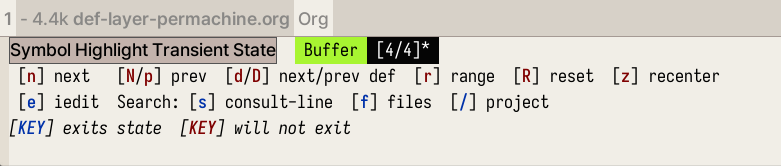
’*’ ’#’ #심볼 Symbol Transient State
- EVIl 관련 훈련을 좀 했어야 되는데 이제 알았네. 된장.
그리고 Spacemacs 에서 제공하는 Transient State 는 다 이유가 있다. 필요해서 있는 것이다. compleseus 레이어에 가면 수정하면 된다. 여기서 project 가 projectile 에 연결되어 있다. 수정 바람.
 >
>
SpaceVim 설치하며 — VSpaceCode and Spacemacs 비교
Evil Tips Examples
| Key | For | Used |
|---|---|---|
| vip | evil-inner-passage | Very Often |
| vis | evil-inner-sentence | Very Often |
| gqap | format passage | Very Often |
| gqas | format sentence | Often |
| ci | replace everything within parens | Sometimes |
| dt; | deleting everything until a semicolon | Rare |
| cif | evil-cp-inner-form | Rare |
cif
cif 이게 뭔가? :: evil-cp-inner-form 함수를 호출한다. 즉 괄호 안에 폼을 잘라내기 한다. 아래 리스트가 있다. 아! 이 함수는 evil-cleverparens-text-objects 기능의 일부이다. 이게 될까?
vip vis 등 모르는 세계가 있음을 알다.
- Review of evil-mode for emacs. Evil-mode, the extensible vi layer for-
- My emacs clojure journey Ep 1 - Corgi & evil-mode - YouTube
evil-surround
이걸 드디어 사용한다. 왜?!
evil-textobj-line 텍스트 오브젝트
- VIM https://nolboo.kim/blog/2016/10/13/vim-text-objects-definitive-guide/
- VIM 에서 편집을 효과적으로 하려면, 단순히 문자를 넘어서 단어, 문장, 문단을 편집해야 한다.VIM 에서 이런 하이레벨의 컨텍스트를 텍스트 개체라고 한다.
- VIM 에는 일반 텍스트 개체와 프로그래밍 언어를 위한 텍스트 개체가 있다. 텍스트 개체를 배우면 VIM 편집이 완전히 새로운 단계의 정확도와 속도를 가지게 된다.
Spacemacs Focus Document
여기 문서도 좋다.
/home/junghan/sync/man/dotsamples/spacemacs/ghasak-dot-spacemacs/docs/emacs_tips_tricks/multi_cursor.md:
Evil for Viim Style Editing
Evil for Vim Style Editing - Practicalli Spacemacs
2022 evil-emacs forward backward keybinding
알아야 할 키 바인딩
M-x 영원하라 메타엑스! M-m SPC 와 같음. 스페이스맥스 root 라고 함. M-RET 마이너모드 명령셋 노멀 모드에서 , 과 같음. C-g keyboard-quit :: 이걸 몰랐었다. 실행 취소!!
evil emacs 를 잘 사용하기 위한 핵심은?
내 생각에는 evil mode 와 상관 없이 원하는 작업을 실행할 수 있는 이맥스 고유의 키 바인딩이라고 생각한다.
vim 에서 편집 모드로 진입하면 메타 키 조합이 아니라면 할 수 있는 일은 텍스트 입력이다. vim 도 제대로 써보지 않은 이유는 모드 전환이 귀찮아서다.
이맥스를 제대로 써보려고 하는데… 그렇다고 이맥스 입력 방식을 공부하기는 싫고… 선택 옵션은 EVIL 이다. 스페이스맥스는 여기에 충실한 이맥스이고 만족스럽다.
이동/삭제/추가 : 캐릭터, 워드, 라인 검색 undo/redo
등. 일관성 있는 방식이 필요하다.
C-r undo-fu only redo $ end 0 home
- insert 모드 방향키 대신 사용하도록 세팅
C-h j k l C-S backspace kill line C-w evil-delete-backward-word C-_ undo-region C-u undo-fu undo C-r undo-fu redo C-$ end C-0 home M-h delete-backward-char M-l delete-forward-char
adslfjaldksjflk ds asdlkk
;; 편집 모드 시, 단어 단위로 지우려면 C-w 를 쓰면 된다 ;; char 를 지우려면 backspace 를 누르면 된다. 이게 불편하다. 추가하자.
alsdkfjlkdsf
w evil forward word : 이동|단어 b evil backward word 이동|단어
- all mode
M-DEL backword-kill-word 커서 이전 워드 단위로 삭제 M-d kill-word M-f forward word M-b backward word
내가 추가한 키 바인딩의 일부이다. 목적은 방향키를 최소한으로 줄이고 일관성 있게 모드 변환을 최소화 하면서 글을 쓸 수 있게 만드는 것이다. 예를 들어 편집 모드에서 쓰다가 노멀 모드로 바꾸고… 이 작업이 매우 번거롭다. 최소한의 기능은 편집 모드에서도 가능해야 한다. 특히 일반적인 편집 기능의 경우.
다행인 것은 이맥스는 에빌 모드만 지원하는게 아니라는 것이다. 물론 스페이스맥스 에빌 모드 환경에서는 기존 이맥스 키 바인딩과 다른 부분이 많아서 막 넣을 수가 없다.
그럼에도 함수는 여전히 있기에 적당히 맞춰 넣어주면 편집, 이동이 무난하게 가능하다.
evil-escape 도 ,. 으로 매핑해 놓았는데 괜찮다. ESC 를 누르는 것 보다 따닥 누르는게 편할 때가 있다. 예를 들어!! 편집 모드에서 마이너모드 명령을 입력하고 싶을 때 , . , 을 따다닥 눌르면 가능했다.
근데… M-RET 을 누르면 모드에 상관 없이 마이너모드 명령어를 쓸 수 있다. 그럼에도 evil-escape 는 쓸만하다. 괜히 있는게 아니다. 아! 원래 매핑은 fd 에 되어 있다. 한글 입력 중에는 ㄹㅇ이 입력되니까… 영문으로 바꾸고 해야 한다는 말이다. 그러기에 , . 을 사용하는 것이다. 물론 더 좋은 키 매핑이 있을 수도 있다. 큰 고민한 것은 아니니까.
(evil-define-key '(normal insert visual) org-mode-map (kbd "C-c h") 'org-insert-heading)
(evil-define-key '(normal insert visual) org-mode-map (kbd "C-c s") 'org-insert-subheading)

;; 헤딩 이동을 편하게 하자
(define-key org-mode-map (kbd "C-n") 'org-next-visible-heading)
(define-key org-mode-map (kbd "C-p") 'org-previous-visible-heading)

;; 편집 모드에서 방향키를 커버하는 방법
;; evil-mode 에서 기존 키 바인딩 C-k를 제거한다.
;; 나머지 키는 큰 문제 없어서 그냥 둔다.
(keymap-unset-key [C-k] "evil-mode")

;; insert 모드에서 방향키로 쓰도록 세팅한다. evil-xxx-line 대신
;; 이맥스 기본 이동으로 세팅 했다.
(evil-define-key '(insert) org-mode-map (kbd "C-h") 'left-char)
(evil-define-key '(insert) org-mode-map (kbd "C-l") 'right-char)
(evil-define-key '(insert) org-mode-map (kbd "C-j") 'next-line)
(evil-define-key '(insert) org-mode-map (kbd "C-k") 'previous-line)

;; 이상하게 기존 키 바인딩이 안지워진다. 이건 나중에 다시 하자.
;; (define-key org-mode-map (kbd "M-h") nil)
;; (define-key org-mode-map (kbd "M-l>") nil)
;; (keymap-unset-key [M-h] "evil-mode")
;; (keymap-unset-key [M-l] "evil-mode")
;; (evil-define-key '(insert) org-mode-map (kbd "M-h") 'delete-backward-char)
;; (evil-define-key '(insert) org-mode-map (kbd "M-l") 'delete-forward-char)

(evil-define-key '(insert) org-mode-map (kbd "C-u") 'undo-fu-only-undo)
(evil-define-key '(insert) org-mode-map (kbd "C-r") 'undo-fu-only-redo)

(evil-define-key '(insert) org-mode-map (kbd "C-0") 'org-begginng-of-line)
(evil-define-key '(insert) org-mode-map (kbd "C-4") 'org-end-of-line)
이미지 없이 embark 로 복사하는 방법을 찾자.
이 방법이 있으면 정말 이맥스를 거의 문서화 하고 설명하는데 유리해진다.
vim keybindings
translate:: VIM 핵심 키맵 alias:: project:: url:: person:: progress:: [BROKEN LINK: write],
create-at:: [BROKEN LINK: 2022-07-06] week-at:: #2022-W27 editcount:: 2
입력모드 i 를 넘어서자.
i: 커서 앞a: 커서 뒤I: 줄 앞 — i + HomeA: 줄 끝o: 빈줄 넣고 입력r: 한글자 수정R: 수정 모드
-
** 명령모드에서 방향키를 넘어서자.
:CUSTOM_ID: 명령모드에서-방향키를-넘어서자.
-
* 단어 단위 이동
:CUSTOM_ID: 단어-단위-이동
w: Next wordb: previous word
-
* 문자 단위 이동
:CUSTOM_ID: 문자-단위-이동
h j k l: arrow keys
-
* 문단 단위 이동
:CUSTOM_ID: 문단-단위-이동
{: 문단 시작으로}: 문단 끝으로
-
* 화면 내에서 이동
:CUSTOM_ID: 화면-내에서-이동
H: 화면 맨 위로L: 화면 맨 아래로M: 화면 가운대로
-
* 페이지 단위 이동
:CUSTOM_ID: 페이지-단위-이동
ctrl u: 반 페이지 위로ctrl d: 반 페이지 아래로
-
-
** 복붙은 v 보다 V 를 쓰자
:CUSTOM_ID: 복붙은-v 보다-v 를-쓰자
v: 선택 모드V: 줄 단위 선택 모드x: 오려두기d: 삭제p: 붙여넣기
Move and Kill Editing Keybindings in Emacs
Hungry Delete with S-<backspace> S-<DEL>
이게 완벽한 조합이었다. 반영했다.
spacemacs.org 참고
home/junghan.spacemacs.d/dot-org/spacemacs.org
jh-editing 참고
home/junghan.spacemacs.d/dot-org/jh-editing.org
iedit
빌트인 아님. 그러나 중요.
iedit - edit multiple regions simultaneously
evil-iedit-state
이걸로 못할게 없다.
먼저 rg-menu 로 regex 검색을 한다음에 wgrep 으로 잡고
v 눌러서 visual block 으로 잡고 SPC s e 하면 파란색이 잡힌다. insert 모드로 변경해서 수정하면 된다.
https://github.com/syl20bnr/evil-iedit-state
TEMP auto-highlight-symbol and evil-visualstar
스페이스맥스에 설치 되어 있는 두 패키지를 보라. 장단점이 명확하다.
“evil-visualstar” 는 기본은 꺼져 있다. 켜주라.
왜 켜줘야 하는가? 비주얼 모드로 선택한 텍스트만 다룰 수 있으니까. 이게 없다면 그냥 타이핑 하면 된다. 아니면 ripgrep 도 된다. 필요 없다면 지우고. 되도록 타이핑 안하면 편하지 않는가? 지금 이것도 입력하려면 힘들텐데
evil-snipe
Description
This layer adds various replacements for vim’s default search functions.
- Alternative implementation of vim’s default search operations.
- Replacement of evil-surround with a two-character search.
- Support for alternative scopes for default search operations.
- Support for alternative motions based on configurable regexps.
Install
Layer
To use this configuration layer, add it to your ~/.spacemacs. You will need to add evil-snipe to the existing dotspacemacs-configuration-layers list in this file.
Improved f and t search behavior
With evil-snipe you can define your own search scope for f and t searches which means that you won’t have to jump to the correct line before searching with f / t / F / T. And after you have found a match, you can just press f or t again afterwards to continue the search. No need to use ; / ,.
이블스닙을 사용하면 f 및 t 검색에 대한 검색 범위를 직접 정의할 수 있으므로 f / t / F / T 로 검색하기 전에 올바른 줄로 이동하지 않아도 됩니다. 일치하는 항목을 찾은 후에는 에프 또는 티 를 다시 눌러 검색을 계속할 수 있습니다. 를 사용할 필요 없이 ; / , 를 누르면 됩니다.
This alternate behavior is disabled by default, to enable it set the layer variable evil-snipe-enable-alternate-f-and-t-behaviors to t:
(setq-default dotspacemacs-configuration-layers
  '((evil-snipe :variables evil-snipe-enable-alternate-f-and-t-behaviors t)))
Two-character search with s
With the s~/~S keys you can do a simple search like f~/~t, but instead of searching for one character, you search for two. This makes the search a lot more precise than regular f~/~t searches. While you can search forward or backwards in the buffer with / and ?, s / S are much easier to reach, don’t require you to press enter and they are precise enough for many common purposes.
S~/S 키를 사용하면 f~/~t~와 같은 간단한 검색을 수행할 수 있지만, 한 문자를 검색하는 대신 두 문자를 검색합니다. 따라서 일반 ~f~/~t 검색보다 훨씬 더 정확하게 검색할 수 있습니다. 버퍼에서 / 및 ? 로 앞뒤로 검색할 수 있지만, s / S 는 훨씬 더 쉽게 찾을 수 있고, 엔터키를 누를 필요가 없으며, 많은 일반적인 용도로 충분히 정확합니다.
More scopes
Evil-snipe also adds several scope options for searches (set evil-snipe-scope and evil-snipe-repeat-scope to one of these, the default value is buffer):
| Value | Description |
|---|---|
| buffer | search in the rest of the buffer after the cursor (vim-sneak behavior) |
| line | search in the current line after the cursor (vim-seek behavior) |
| visible | search in the rest of the visible buffer only |
| whole-line | same as line, but highlight matches on either side of cursor |
| whole-buffer | same as buffer, but highlight all matches in buffer |
| whole-visible | same as visible, but highlight all visible matches in buffer |
If you do not want to replace the regular f / F / t / T behavior, just remove this line from evil-snipe/packages.el: (evil-snipe-replace-evil)
Symbol groups
With symbol groups you can let a character stand for a regex, for example a group of characters. By adding a pair of (CHAR REGEX) to the list evil-snipe-aliases you can search for a regex very simply:
-
Here we set the
[character to meanall characters [({in all modes so a search withsa[would finda[,a{ora(.;; Alias [ and ] to all types of brackets (push '(?\[ "[[{(]") evil-snipe-aliases) (push '(?\] "[]})]") evil-snipe-aliases) -
Here we set the char
:to mean “a regex matching python function definitions” (but only in python-mode), so by searching withf:fffyou can quickly cycle through all function definitions in a buffer!;; For python style functions (add-hook 'python-mode-hook (lambda () (make-variable-buffer-local 'evil-snipe-aliases) (push '(?: "def .+:") evil-snipe-aliases)))
Key bindings
| Key binding | Description |
|---|---|
f | search forward for the next entered character and set the cursor to it’s position |
F | search backward for the next entered character and set the cursor to it’s position |
t | search forward for the next entered character and set the cursor before it’s position |
T | search backward for the next entered character and set the cursor before it’s position |
s | search forward for the next entered two characters and set the cursor to it’s position |
S | search backward for the next entered two characters and set the cursor to it’s position |
#관련노트
코지 이맥스 클로저 개발 환경
코지 이맥스 매뉴얼 클로저 이블 - emacs clojure evil ide
하워드 아저씨 ha-evil.org 훌륭함
@하워드아브람스 HowardAbrams 구루 리터레이트 이맥스 - hamacs
vanilla/hamacs-evil/ha-evil.org
신기한 조합이 많네. 그러나 일단 둠이맥스 바인딩을 사용해라
아카이빙
2023 전반적인 개선 검토 필요 by Injae
이렇게 많다. 좋은 것은 써라. 아래 인제님 보니 용법이 있더라.
evil-anzu evil-args evil-collection evil-escape evil-exchange evil-iedit-state evil-indent-plus evil-lion evil-nerd-commenter evil-matchit evil-numbers evil-surround evil-textobj-line evil-unimpaired evil-visual-mark-mode evil-visualstar evil-tutor evil-lisp-state evil-cleverparens
/home/junghan/sync/man/dotsamples/korean/injae-dotfiles/module/+evil.el
전반적으로 에빌 시스템을 검토할 필요가 있다. 안쓰는게 너무 많다. 몰라서 그렇다. 기능을 추가하지 마라! Spacemacs 기본으로 가야 된다.
    (evil-want-C-u-scroll t)
    (evil-symbol-word-search t)
    (evil-want-minibuffer t)
    (define-key evil-normal-state-map (kbd "q") 'nil) ; evil macro disable
    (define-key evil-visual-state-map (kbd "R") 'evil-visual-exchange-corners)
    (setq-default evil-kill-on-visual-paste nil)
    ;; visual mode 'p' command update clipboard problem fix

;; (global-evil-visualstar-mode t) 없는 것과 있는 것의 차이는?

;;;; string-infraction
;; (use-package evil-string-inflection
;; :config (define-key evil-normal-state-map "gR" 'evil-operator-string-inflection)
;; )

;;;; indent-plus

;;;; evil-surround
; @call-function
; visual mode S- or gS-
; normal mode ys- or yS-
; change surround cs-
; delete surround ds-
; @select area
; call-functionu- - ;현재부터 단어 끝까지
; {call-function}-i- ;현재 단어
; {call-function}-s- ;현재 줄
; @wrap function
; {select-area}-w
; ${target}( 바꾸고싶은거 ), ${change}(바뀔거)
; 감싸기:     => y-s-i-w-${change}( "(", "{", "[")
; 전부 감싸기 => y-s-s-${change}
; 바꾸기: => c-s-${target}( "(", "{", "["), ${change}
; 벗기기: => d-s-${target}( "(", "{", "[")
Comments